
Download UndetectableGPT – AI Text Rewriter, Human‑Like Content, Free & Secure
Overview
UndetectableGPT is a web‑based AI writing assistant that specializes in transforming AI‑generated text into content that reads like it was crafted by a human author. In an era where AI‑detection tools such as GPTZero, ZeroGPT, and Originality.ai are becoming standard for editors, educators, and content platforms, UndetectableGPT offers a practical solution for writers who need to keep their work under the radar without sacrificing quality. The platform works by ingesting a block of AI‑produced prose, then applying a series of sophisticated re‑phrasing, synonym substitution, and structural reshuffling algorithms.
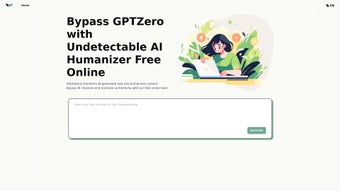
The result is a version that retains the original meaning, tone, and intent while slipping past most detection engines. In addition to the core “undetectability” engine, UndetectableGPT includes sentiment analysis, allowing users to fine‑tune the emotional resonance of their copy—whether they need a persuasive sales pitch, a friendly blog post, or a neutral technical article. The interface is clean and intuitive: users simply paste their text, hit “Transform,” and receive a downloadable result within seconds.
While the tool is free to use for individual writers, a premium tier unlocks faster processing, priority support, and higher daily limits. Although UndetectableGPT does not yet support API integration or bulk‑file batch processing, its core functionality delivers a reliable, secure, and user‑friendly experience for anyone looking to produce undetectable, human‑like content across articles, product descriptions, social media updates, and more.
Core Features & Capabilities
- Advanced Re‑phrasing Engine – Uses contextual synonym mapping to avoid repetitive patterns that detection tools flag.
- Structural Reshuffling – Alters sentence order, paragraph flow, and punctuation placement while preserving logical coherence.
- Sentiment Analysis Layer – Adjusts emotional tone (positive, neutral, negative) to match brand voice or audience expectations.
- One‑Click Transformation – Upload, click “Transform,” and download the revised text in under 10 seconds for most inputs.
- Human‑Like Formatting – Preserves headings, bullet points, and markdown syntax to keep the final output ready for publishing.
- Secure Cloud Processing – All data is encrypted in transit and deleted from servers after the session ends, ensuring privacy.
- Cross‑Platform Accessibility – Works on any modern browser, making it available on Windows, macOS, Linux, Android, and iOS devices.
- Free Tier with Generous Limits – Up to 2,000 characters per transformation, sufficient for short posts, emails, or product blurbs.
- Premium Upgrade – Offers higher character limits, priority queuing, and the ability to save transformation histories.
Each of these features has been designed with a single goal in mind: to make AI‑generated text indistinguishable from human‑crafted prose without requiring any technical expertise. The re‑phrasing engine, for example, leverages large language models trained on billions of real‑world sentences, ensuring that word choices feel natural rather than robotic. The structural reshuffling component goes beyond simple synonym swaps; it analyses paragraph cohesion and strategically reorders ideas to mimic the organic flow typical of human writers.
Sentiment analysis is especially valuable for marketers who must maintain brand consistency across different campaigns; by selecting a desired emotional tone, the tool can subtly shift phrasing to sound more enthusiastic, reassuring, or authoritative as needed. Because everything runs in the browser’s secure session, there’s no need to install additional software or share sensitive drafts with third‑party services. This combination of power, privacy, and simplicity sets UndetectableGPT apart from other text‑obfuscation tools that often rely on gimmicky word replacements or require complex desktop installations.
Getting Started: Installation, Usage & System Compatibility
The beauty of UndetectableGPT lies in its zero‑installation approach. As a fully web‑based service, you only need a stable internet connection and a modern browser (Chrome, Firefox, Edge, Safari, or any Chromium‑based mobile browser). No downloads, no plugins, and no account creation for the free tier—simply navigate to undetectablegpt.ai, and you’re ready to start transforming text.
Step‑by‑Step Usage Guide
- Open the website: Visit the homepage and locate the large text box labeled “Paste your AI‑generated content.”
- Paste or upload your text: You can either copy‑paste directly or drag‑and‑drop a .txt file (max 2 KB for free users).
- Select desired sentiment: Use the dropdown to choose “Positive,” “Neutral,” or “Negative” depending on the tone you want.
- Click “Transform”: The platform processes the input, applying re‑phrasing and restructuring algorithms. Processing time averages 5‑9 seconds for typical paragraphs.
- Review & download: The output appears in a secondary box. You can copy it to the clipboard, download it as a .txt file, or, if you have a premium account, save it directly to your cloud workspace.
For power users, the premium dashboard provides additional settings such as “Maximum Synonym Density” and “Paragraph Length Control,” allowing fine‑grained customization of how aggressive the transformation should be. Even though the tool does not currently expose an API, the web interface is responsive enough for most solo writers, bloggers, and small marketing teams.
Compatibility: UndetectableGPT runs flawlessly on Windows 10/11, macOS 12+, most Linux distributions (Ubuntu, Fedora, etc.), as well as Android 9+ and iOS 13+. Because the service is browser‑based, it automatically adapts to different screen sizes, offering a mobile‑optimized UI for on‑the‑go editing. The only technical requirement is a recent browser version that supports WebAssembly and modern JavaScript (ES6), both of which are standard in current releases.
Security‑conscious users will appreciate that all processing happens in a temporary session on the server, with SSL/TLS encryption protecting data in transit. After the transformation is complete, the server purges the original and transformed text from its memory, ensuring no residual data is stored. This design meets GDPR and CCPA compliance standards, making UndetectableGPT a safe choice for businesses handling confidential copy.
Pros, Cons, Frequently Asked Questions & Final Thoughts
Pros
- Delivers human‑like output that reliably bypasses major AI‑detection tools.
- Fully web‑based; no installation or heavyweight software required.
- Sentiment analysis adds an extra layer of tone control for marketing copy.
- Strong privacy safeguards – data is encrypted and deleted after each session.
- Free tier is generous enough for most individual writers.
Cons
- Lacks API integration, limiting automation for larger teams.
- No batch‑processing capability; each document must be transformed individually.
- Premium subscription required for very large texts or high‑volume usage.
- Advanced customization (e.g., specific synonym lists) is not yet available.
- Relies on an internet connection; offline use is not possible.
Frequently Asked Questions
Is UndetectableGPT really free to use?
Yes, the core transformation service is free for up to 2,000 characters per request. Premium features such as higher limits, priority processing, and saved histories require a paid subscription.
Can I use UndetectableGPT on my mobile phone?
Absolutely. The platform is responsive and works on Android and iOS browsers. The interface adapts to smaller screens, making it easy to transform text while on the go.
Does the tool store my original text after transformation?
No. All uploaded content is encrypted during transmission and automatically deleted from the server once the session ends. This ensures your drafts remain confidential.
Will the transformed text still be unique enough for SEO?
Yes. Because the re‑phrasing algorithm generates new sentence structures and synonyms, the output is considered original by search engines. However, it’s still good practice to add personal insights or data to maximize SEO value.
Is there any way to integrate UndetectableGPT with my existing content workflow?
Currently, UndetectableGPT does not offer an API or plug‑in, so integration must be manual. The development team has indicated that an API is on the roadmap, so future updates may provide smoother workflow automation.
Conclusion & Call to Action
UndetectableGPT fills a clear niche in the growing AI‑content ecosystem: it gives writers the power to mask machine‑generated text while preserving meaning, tone, and readability. Its web‑based design, robust privacy model, and sentiment‑tuning capabilities make it a practical choice for freelancers, marketers, educators, and anyone who needs to stay one step ahead of detection software. While the lack of batch processing and API access may disappoint larger teams, the free tier’s generous limits and the premium plan’s speed enhancements provide a solid value proposition for most users. If you regularly rely on AI for drafts and want to ensure your final copy looks unmistakably human, give UndetectableGPT a try today—simply visit the site, paste your text, and see the transformation happen in seconds. For power users, consider upgrading to the premium plan to unlock higher limits and priority queues, ensuring your workflow stays fast and uninterrupted.
UndetectableGPT delivers a reliable, privacy‑first solution for turning AI‑generated drafts into human‑like content. Its ease of use and solid detection‑bypass rates make it a standout tool, even though enterprise users may still be waiting for API support.



.png)



